Facebook Marketing
Prerequisites for Configuring Facebook Marketing Data Source
Facebook Account Access
- A valid Facebook account with access to Facebook Ads Manager
- Admin-level permissions for the ad accounts you want to connect
API Access
- Facebook Graph API credentials (App ID and App Secret)
- A valid access token with permissions to read ad-related data
Ad Account and Campaigns
- Ensure that the Facebook Ads account and associated campaigns are active
Data Scope
- Identify the data you want to sync, such as ad campaigns, performance metrics, and audience insights
Configuring Facebook Marketing Data Source
- Select the Source Type as Facebook Marketing
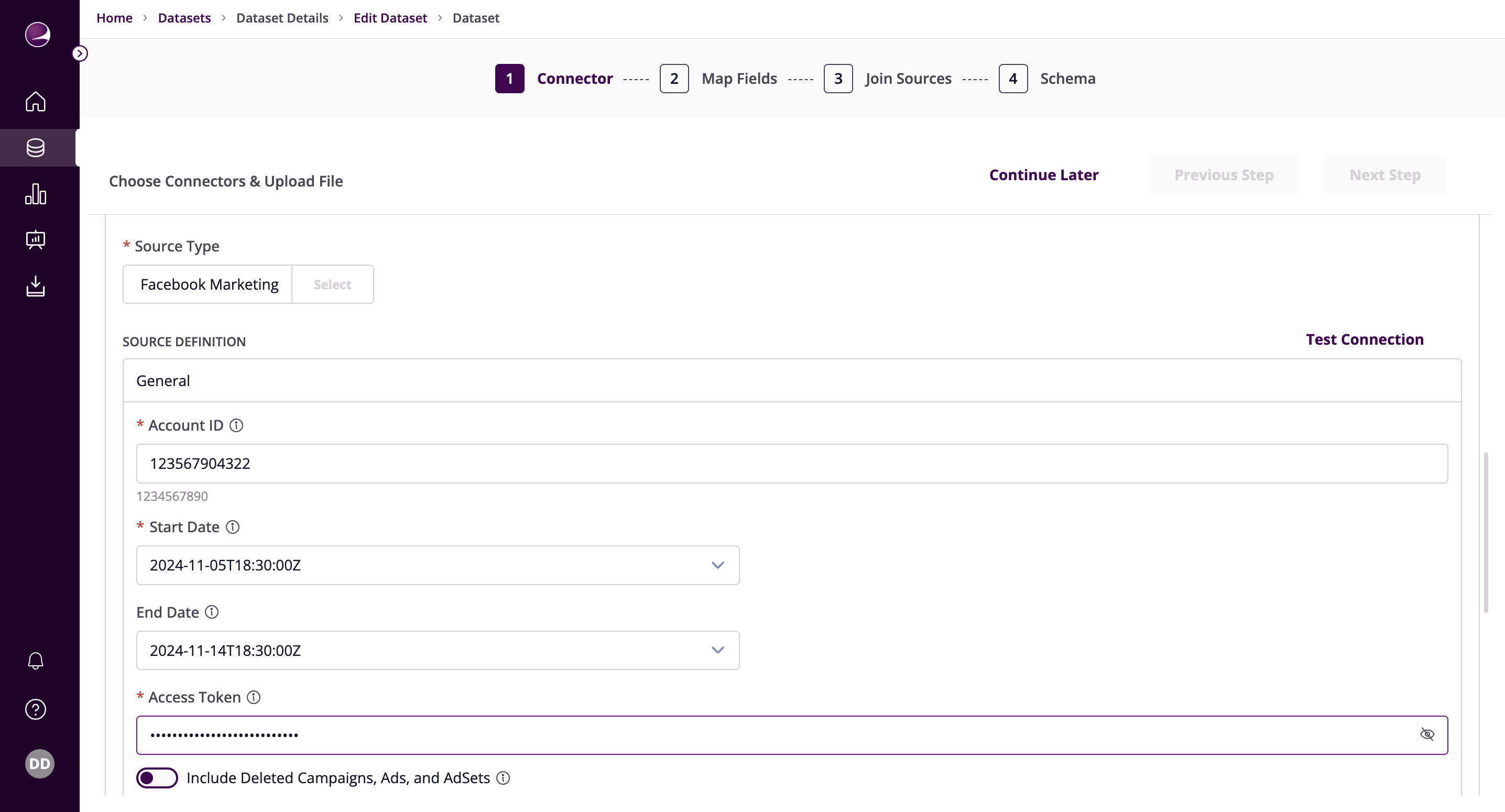
- Fill in the required details:
Account ID - The Facebook Ad account ID to use when pulling data from the Facebook Marketing API. Open your Meta Ads Manager. The Ad account ID number is in the account dropdown menu or in your browser's address bar. See the docs for more information.
- Example:
111111111111111
- Example:
Start Date - The date from which you'd like to replicate data for all incremental streams, in the format YYYY-MM-DDT00:00:00Z. All data generated after this date will be replicated.
- Example:
2017-01-25T00:00:00Z
- Example:
End Date - The date until which you'd like to replicate data for all incremental streams, in the format YYYY-MM-DDT00:00:00Z. All data generated between the start date and this end date will be replicated. Not setting this option will result in always syncing the latest data.
- Example:
2017-01-26T00:00:00Z
- Example:
Access Token - The value of the generated access token. From your App's Dashboard, click on 'Marketing API', then 'Tools'. Select permissions ads_management, ads_read, read_insights, business_management. Then click on 'Get token'.
Include Deleted Campaigns, Ads, and AdSets - Set to active if you want to include data from deleted Campaigns, Ads, and AdSets.
Fetch Thumbnail Images from Ad Creative - Set to active if you want to fetch the thumbnail_url and store the result in thumbnail_data_url for each Ad Creative.
Custom Insights - You may provide a list of ad statistics entries. Each entry should have a unique name and can contain fields, breakdowns or action_breakdowns. Fields refer to the different data points you can collect from an ad, while breakdowns and action_breakdowns let you segment this data for more detailed insights.
Page Size of Requests - You can specify the number of records per page for paginated responses. Most users do not need to set this field unless specific issues arise or there are unique use cases that require tuning the connector's settings. The default value is set to retrieve 100 records per page.
Insights Window Lookback - You may set a window in days to revisit data during syncing to capture updated conversion data from the API. Facebook allows for attribution windows of up to 28 days, during which time a conversion can be attributed to an ad. If you have set a custom attribution window in your Facebook account, please set the same value here. Otherwise, you may leave it at the default value of 28. For more information on action attributions, please refer to the Meta Help Center.
Maximum size of Batched Requests - Maximum batch size used when sending batch requests to Facebook API. Most users do not need to set this field unless they specifically need to tune the connector to address specific issues or use cases.
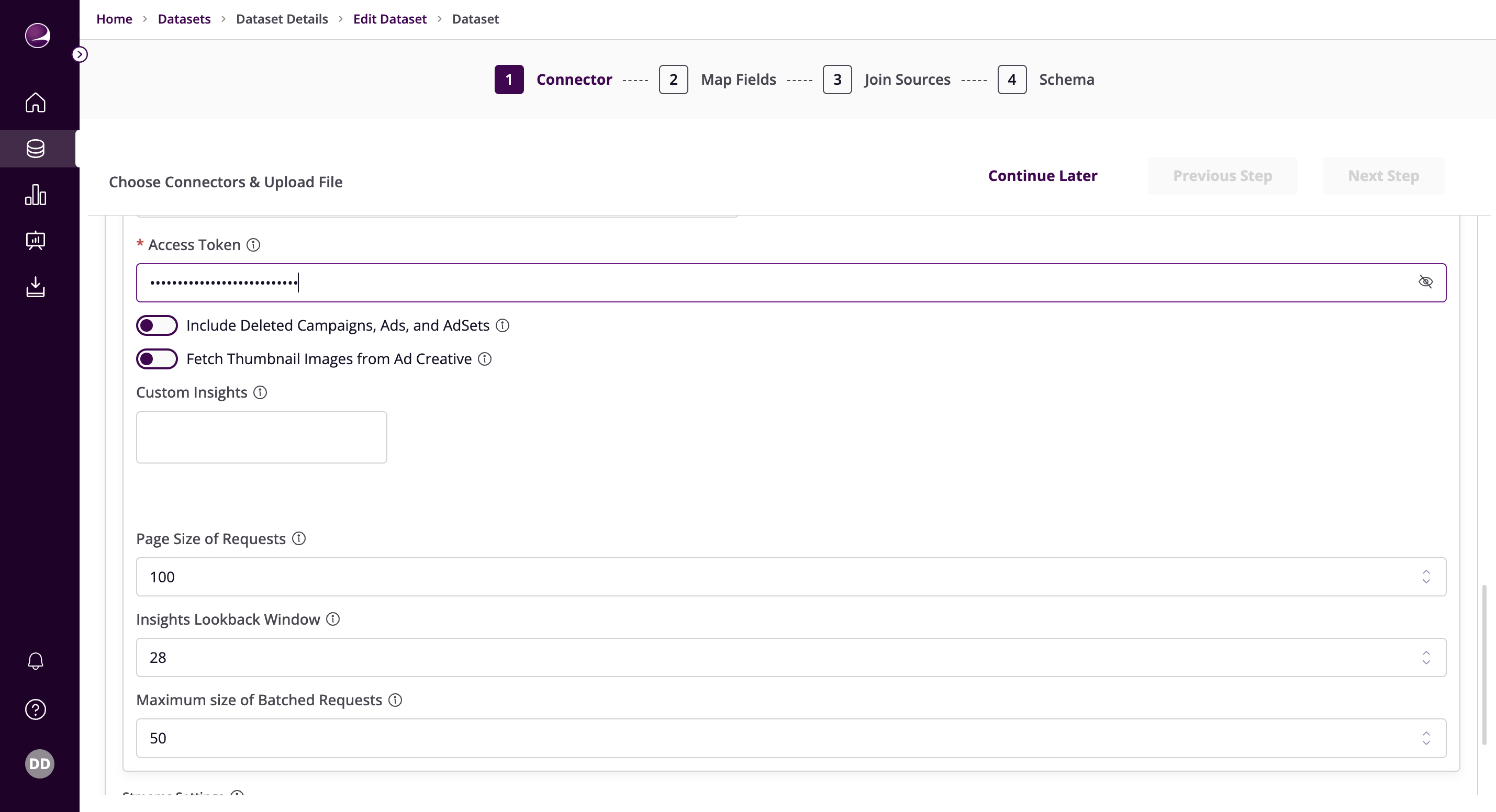
- Click on Test Connection to verify if the connection is established successfully.